
What's New
Recent features and improvements in BackupMonitor.
October 2026
Custom Email Format: HTML emails and German status values
Custom-format emails without a plain-text part, as sent by many
webmail clients, are now recognised. The Status field
also accepts the German values Erfolgreich and
Warnung.
NAKIVO Backup & Replication
Job Run Reports from NAKIVO Backup & Replication are now recognised for both backup jobs and backup copy jobs. Every virtual machine in a job is shown as its own device, with the result of its last run and the start time of the job.
Arx One Backup
Transfer reports from Arx One Backup are now recognised. Each backup account is shown as its own device, with the backup task, the result of the transfer and its start time.
September 2026
Veritas System Recovery
Event notifications from Veritas System Recovery are now recognised as backup results. Each completed backup job shows up as its own job per server, offsite copies are tracked as a separate job per offsite destination, and the start of each job is shown as a notification. Failures and warnings are taken from the event code, so they are detected regardless of the notification language.
N-able Cove Data Protection
Daily device dashboards from N-able Cove Data Protection (formerly SolarWinds Backup) are now recognised as backup results. Each data source, such as files and folders or system state, shows up as its own job with the status of its last session, and a missing daily dashboard is reported as overdue.
SQL Backup Master
Job notifications from SQL Backup Master (Key Metric Software) are now recognised as backup results. Each mail shows the job name, the SQL Server machine, the status and the job start time, and a missing daily notification is reported as overdue.
Acronis Cyber Protect Cloud: Italian Reports and Daily Alert Digest
Backup reports from Acronis Cyber Protect Cloud in Italian are now recognised, including job name, start time and status. The daily status report (in English, German and Italian) is now shown as notifications, with one entry per active alert. Examples are machines that have been offline for a long time, failed agent updates and threat detections. Critical alerts and errors are shown as errors, warnings as warnings, and each entry names the affected device or backup plan.
LANCOM Unified Firewall: Internet and VPN Events
Event mails from LANCOM R&S Unified Firewall appliances (UF series) are now recognised as notifications. A switch to the backup internet connection and a dropped site-to-site IPsec tunnel are shown as a warning, the return to the standard connection and the restored tunnel as an information. When one mail batches several events, each is listed separately with its own event time and the name of the affected connection or tunnel.
HPE iLO: Server Hardware Alerts
Alert mails sent by the Integrated Lights-Out management controller of HPE ProLiant servers are now recognised as notifications. Events such as a lost network link are shown as an error, the matching "REPAIRED" mail as an information — including the affected iLO name and the exact time of the event.
Fujitsu iRMC: Server System Events
System event mails from the iRMC management controller of Fujitsu PRIMERGY servers are now recognised as notifications. Critical events such as a memory module error are shown as an error, predicted failures and failed logins as a warning, and routine events such as a completed boot as an information.
Veeam: Job Level Warnings Are No Longer Hidden
Veeam sometimes finishes a job with a warning — for example when the backup repository is running low on free disk space — while every single machine in the report is still listed as "Success". Those backups were shown as successful and the warning went unnoticed. Such jobs are now shown as Warning and the reason from the report is displayed as the message. If the report already flags a specific machine as warning or error, nothing changes.
Apply a Schedule to All Jobs of a Device
The job edit dialog now has an "Apply Schedule to all Jobs of this Device" button. It copies the recurrence, weekdays or monthly settings and the number of allowed error days onto every job of the same device — useful when a device gained new jobs that all follow the same backup plan. A confirmation is shown first, since the schedules of the other jobs are overwritten.
August 2026
Clearer Dashboard for Devices with Many Jobs
Devices with a large number of jobs — such as a Veeam Microsoft 365 backup with one job per mailbox, OneDrive and SharePoint site — no longer bury a handful of failures under thousands of successful rows. The device now shows a short summary of its job, error and warning counts, lists the jobs that need attention first, and keeps the rest behind a "show all" button. Once expanded, a filter box makes it easy to jump to a specific job.
Elovade
Elovade Microsoft 365 backup summary reports are now recognized. Each daily report becomes a backup entry for the protected account, so a partially failed report shows up as a warning and a report that never arrives is flagged as overdue.
Arcserve StorageCraft ImageManager
Arcserve StorageCraft ImageManager notifications are now recognized. Per-server consolidation, replication and disk space errors show up as backup history, the daily multi-server summary appears as a notification report, and service-level ImageManager errors show up as a critical notification.
Datto SIRIS Bootable Screenshot Verification
Datto SIRIS "Bootable Screenshot" backup verification emails are now recognized as backup history, showing whether the automated boot verification for each protected machine succeeded or failed.
Delete a Device
Devices can now be deleted directly from the Edit Device dialog. Deleting a device also removes all of its jobs, backup entries and notifications - so obsolete or mistyped devices no longer clutter the Dashboard. A confirmation step is required, since the deletion cannot be undone.
Delete Groups Without Emptying Them First
Deleting a group no longer requires removing every device from it beforehand. Any devices still assigned to the group are simply unassigned - the devices themselves and their backup history stay untouched.
Italian Synology Active Backup Notifications
Italian-language notifications from Synology Active Backup for Business (failed backup tasks) and Active Backup for Microsoft 365 (completed backup tasks) are now recognized, including the Italian start-time format used in those mails.
StorageCraft ShadowProtect SPX Daily Backup Reports
The daily summary report emails sent by StorageCraft ShadowProtect SPX (English "Daily Backup Report" and German "Täglicher Backup-Bericht") now show up as backup history for each device - success when everything ran, a warning when only some backups for the day succeeded, and an error when none did - instead of being misread as an individual job report. Because it's tracked as a recurring backup job, a missing report is now also flagged as overdue, just like any other backup.
July 2026
Expanded Synology Backup Language Support
Synology Active Backup for Business and Hyper Backup emails are now recognized for more phrasings: the French "a échoué" (failed) and "interrompue" (interrupted) variants, and the English "has been ignored" variant. French Active Backup emails also now use the actual backup start time from the message body instead of the email received time.
Resolve and Filter Notifications
Notifications can now be marked as resolved - resolved entries disappear from the Dashboard and the Notifications list, and can be shown again (and unresolved) via the new Show resolved toggle. Both views also gained a severity filter to quickly narrow notifications down to info, warning, error, or critical entries.
June 2026
Mark as Resolved from the Dashboard
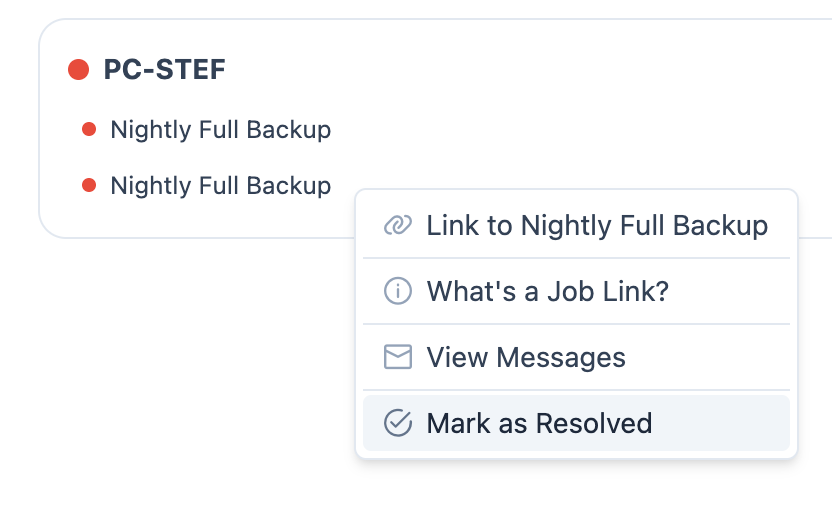
You can now mark a failing job as resolved directly from the Dashboard - right-click any job row and choose Mark as Resolved from the context menu.
Lupus Electronics XT4
BackupMonitor now supports alarm system event emails from the Lupus Electronics XT4. Periodic self-test emails are tracked as daily heartbeat jobs (the device goes to error state if the test email is missing). Contact-open and contact-closed events are recorded per zone as on-demand job entries. Intrusion alarms surface as error entries. Arm/Disarm events from keypads appear as informational security notifications.
Integration API
Query live backup status counts directly from BackupMonitor using
your API key. The new
GET /api/integration/counts endpoint returns success,
error, warning, and other counts for all active jobs — useful for
building internal dashboards, wall displays, or alert scripts that
react when the error count rises.
Custom Email Format
If your backup tool doesn't send emails BackupMonitor already
recognises, you can now send a simple plain-text email in the
BackupMonitor custom format. Include a few labelled fields
(Device, Job, Status,
Timestamp) and the signature line
BackupMonitor Custom — no extra configuration
required.
Ingest API
Push backup results and custom notifications to BackupMonitor
directly from your own scripts or automation tools — no email
required. Two endpoints cover all cases:
POST /api/ingest/backup for structured job results
and POST /api/ingest/notification for free-form
events such as disk space alerts, SSL expiry warnings, or
deployment outcomes.